
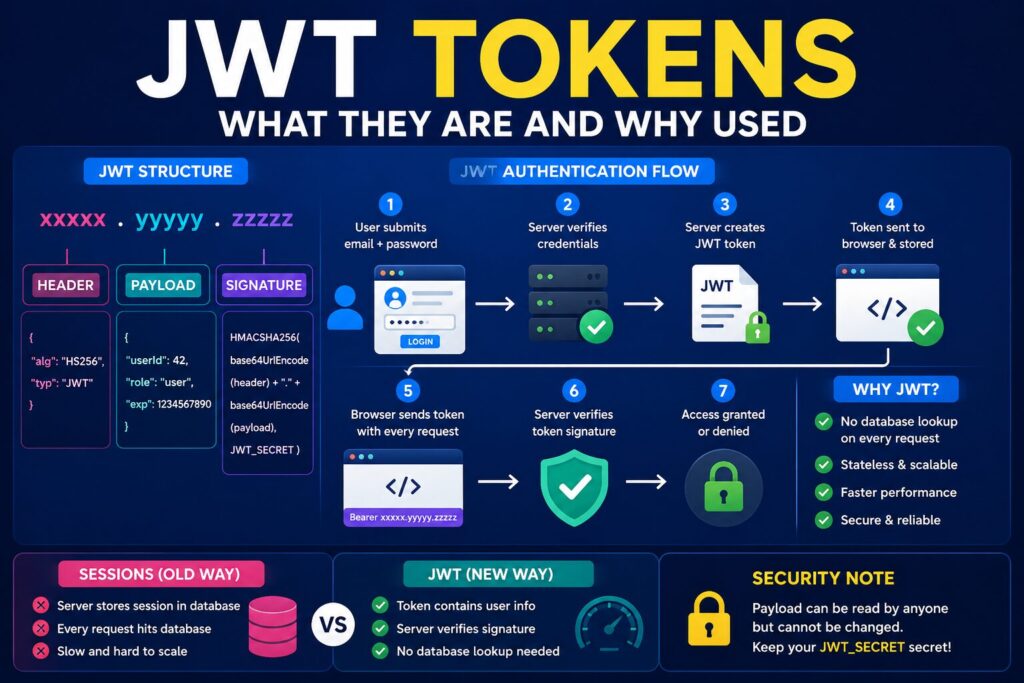

JWT (JSON Web Tokens) are widely used for authentication in modern web apps. This beginner-friendly guide explains how JWT tokens work, why they are faster than traditional sessions, token structure, authentication flow, security secrets, and real-world usage in quiz apps and APIs.
The Problem JWT Solves
When a user logs into your quiz app, the server needs to remember “this person is logged in” for every request they make. But HTTP is stateless — every request is independent, the server remembers nothing between requests.
Old way — Sessions:
User logs in → Server creates session in database → Gives user a session ID cookie
Every request → Server checks database "is this session ID valid?"
Problem — every single request hits the database. Slow. Hard to scale.
New way — JWT:
User logs in → Server creates a signed token containing user info → Sends to browser
Every request → Browser sends token → Server just verifies the signature — NO database lookup needed
What a JWT Actually Is
A JWT is a string with 3 parts separated by dots:
xxxxx.yyyyy.zzzzz
  |      |      |
Header  Payload  Signature
Header — algorithm used to sign Payload — contains user data like:
json
{
  "userId": 42,
  "role": "user",
  "exp": 1234567890
}
Signature — Header + Payload encrypted with your JWT_SECRET
Anyone can read Header and Payload — they are just Base64 encoded. But nobody can fake the Signature without knowing your JWT_SECRET. This is why your secret must stay private.
Why Quiz Project Has Two JWT Secrets
JWT_SECRET       → signs tokens for regular users (quiz takers)
JWT_ADMIN_SECRET → signs tokens for admin panel login
Separate secrets mean even if a user token is somehow compromised, it cannot be used to access the admin panel. Admin tokens are signed with a completely different secret.
JWT Flow in Quiz App
1. User submits email + password
         ↓
2. Server checks database — password correct?
         ↓
3. Server creates JWT:
   { userId: 42, role: "user" } + JWT_SECRET = signed token
         ↓
4. Token sent to browser, stored in localStorage
         ↓
5. User visits quiz page — browser sends token in header:
   Authorization: Bearer xxxxx.yyyyy.zzzzz
         ↓
6. Server verifies signature using JWT_SECRET
   Valid? → Allow access
   Invalid/Expired? → Return 401 Unauthorized
         ↓
7. After JWT_EXPIRES_IN (7 days) — token expires
   User must log in again
No database lookup at step 6 — server just does math to verify the signature. This is why JWT is fast.
Why Changing JWT_SECRET Logs Everyone Out
Your secret is baked into every token’s signature. If you change the secret, all existing tokens have signatures made with the old secret — verification fails for everyone. They must log in again to get a new token signed with the new secret.
FAQ
What is a JWT token?
A JWT token is a digitally signed token used to securely transmit user authentication data between client and server.
Why is JWT faster than sessions?
JWT authentication avoids database lookups on every request because the token itself contains verified user information.
Can JWT payload be read by anyone?
Yes. JWT payloads are Base64 encoded, not encrypted. Sensitive data should never be stored inside JWT payloads.
What happens if JWT_SECRET changes?
All previously issued tokens become invalid and users must log in again.
Where are JWT tokens stored?
JWT tokens are commonly stored in localStorage, sessionStorage, or secure HTTP-only cookies.


