
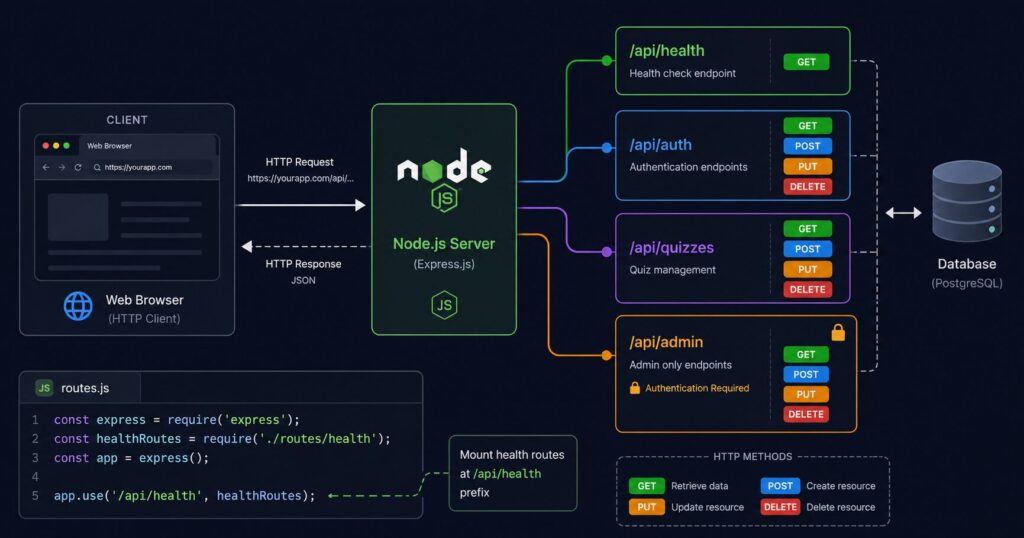

Learn what API endpoints are, how to design them professionally using REST standards, with real Node.js/Express code examples from a live production quiz app.
What is an API Endpoint?
An API (Application Programming Interface) endpoint is a specific URL that your server listens on and responds to. Think of it like a door in a building — each door leads to a different room with a different purpose.
https://quiz.kidssciencemagazine.com/api/health     ← health check door
https://quiz.kidssciencemagazine.com/api/auth/login  ← login door
https://quiz.kidssciencemagazine.com/api/quizzes     ← quiz data door
Every time your frontend (browser) needs data from the backend (Node.js server), it knocks on one of these doors using HTTP methods:
| HTTP Method | Purpose | Real World Analogy |
|---|---|---|
| GET | Read data | Looking at a notice board |
| POST | Create new data | Posting a new notice |
| PUT | Update all of a record | Replacing the entire notice |
| PATCH | Update part of a record | Editing one line of a notice |
| DELETE | Remove data | Tearing down a notice |
Why Endpoints Matter — The Professional Mindset
A well-designed API is like a well-organised office. Every department (resource) has a clearly labelled door. Visitors (clients) know exactly where to go. Nothing is hidden behind unlabelled doors.
Bad API design (what amateurs do):
/getUser
/createUser
/updateUserInfo
/deleteTheUser
/getUserList
Professional REST API design:
GET    /api/users          ← get all users
POST   /api/users          ← create a user
GET    /api/users/:id      ← get one user
PUT    /api/users/:id      ← update a user
DELETE /api/users/:id      ← delete a user
Same resource (users), consistent naming, HTTP method tells you the action. This pattern is called REST (Representational State Transfer).
Category 1 — System Endpoints (Infrastructure)
These endpoints are about the health of your server, not your business logic. Every production application must have these.
/api/health — Basic Health Check
What it does: Returns whether the server is alive and responding.
Why you need it:
- Hostinger and monitoring services ping this to check if your app is running
- Load balancers use it to decide whether to send traffic to this server
- You can check it manually when debugging:
curl https://quiz.kidssciencemagazine.com/api/health
Implementation for ksmquiz:
// routes/health.js
const express = require('express');
const router = express.Router();

router.get('/health', (req, res) => {
  res.status(200).json({
    status: 'ok',
    timestamp: new Date().toISOString(),
    uptime: process.uptime(),
    environment: process.env.NODE_ENV
  });
});

module.exports = router;
Example response:
{
  "status": "ok",
  "timestamp": "2026-05-20T18:00:00.000Z",
  "uptime": 259200,
  "environment": "production"
}
HTTP status codes used:
200— everything fine503— service unavailable (use this if database is down)
/api/health/detailed — Deep Health Check
What it does: Checks all dependencies — database, email service, etc.
Why you need it: Basic health just checks if Node.js is running. Detailed health checks if everything your app depends on is also working.
Implementation for ksmquiz:
router.get('/health/detailed', async (req, res) => {
  const checks = {
    status: 'ok',
    timestamp: new Date().toISOString(),
    uptime: Math.floor(process.uptime()),
    memory: {
      used: Math.round(process.memoryUsage().heapUsed / 1024 / 1024) + 'MB',
      total: Math.round(process.memoryUsage().heapTotal / 1024 / 1024) + 'MB'
    },
    database: 'unknown',
    version: process.env.npm_package_version || '1.0.0'
  };

  // Check database connection
  try {
    await db.query('SELECT 1');
    checks.database = 'connected';
  } catch (err) {
    checks.database = 'disconnected';
    checks.status = 'degraded';
  }

  const statusCode = checks.status === 'ok' ? 200 : 503;
  res.status(statusCode).json(checks);
});
Example response:
{
  "status": "ok",
  "timestamp": "2026-05-20T18:00:00.000Z",
  "uptime": 259200,
  "memory": {
    "used": "63MB",
    "total": "128MB"
  },
  "database": "connected",
  "version": "1.0.0"
}
When database is down:
{
  "status": "degraded",
  "database": "disconnected"
}
HTTP status 503 — monitoring tools alert you immediately.
/api/version — App Version
What it does: Returns the current version of your application.
Why you need it: When you have deployed a new version, you can verify it actually deployed by checking this endpoint. Useful when debugging “which version is running on the server?”
router.get('/version', (req, res) => {
  res.json({
    version: process.env.npm_package_version || '1.0.0',
    name: 'ksmquiz-backend',
    node: process.version,
    deployed: process.env.DEPLOY_DATE || 'unknown'
  });
});
Category 2 — Authentication Endpoints
These handle user identity. The most security-critical part of your API.
/api/auth/register — User Registration
What it does: Creates a new user account.
Flow in ksmquiz:
POST /api/auth/register
Body: { name, email, password }
         ↓
1. Validate email format, password strength
2. Check email not already registered
3. Hash password with bcrypt (cost factor 10)
4. Save to users table
5. Send welcome/OTP email via Brevo
6. Return success (do NOT return password hash)
Professional request validation:
router.post('/auth/register', async (req, res) => {
  const { name, email, password } = req.body;

  // Always validate inputs
  if (!name || !email || !password) {
    return res.status(400).json({
      error: 'Name, email and password are required'
    });
  }

  if (password.length < 8) {
    return res.status(400).json({
      error: 'Password must be at least 8 characters'
    });
  }

  // Email format check
  const emailRegex = /^[^\s@]+@[^\s@]+\.[^\s@]+$/;
  if (!emailRegex.test(email)) {
    return res.status(400).json({
      error: 'Invalid email format'
    });
  }

  // ... rest of registration logic
});
HTTP status codes:
201 Created— user created successfully400 Bad Request— missing or invalid fields409 Conflict— email already registered
/api/auth/login — User Login
What it does: Verifies credentials and returns a JWT token.
Flow:
POST /api/auth/login
Body: { email, password }
         ↓
1. Find user by email
2. Compare password with bcrypt hash
3. If valid: generate JWT signed with JWT_SECRET
4. Return token + user info (no password hash)
What to return:
{
  "token": "eyJhbGc...",
  "user": {
    "id": 42,
    "name": "John",
    "email": "john@example.com"
  },
  "expiresIn": "7d"
}
What NOT to return:
{
  "password_hash": "$2a$10$..."
}
Never return password_hash, never return JWT_SECRET, never return internal IDs you don’t need to expose.
HTTP status codes:
200 OK— login successful400 Bad Request— missing email or password401 Unauthorized— wrong password404 Not Found— email not registered
/api/auth/logout — Logout
What it does: In JWT-based apps, logout is mostly client-side (delete the token). But a server-side endpoint is still good practice.
Why have it if JWT is stateless:
- Log the logout event for security auditing
- Can add a token blacklist if needed
- Provides a consistent API pattern
- Frontend always calls the same endpoint
router.post('/auth/logout', authenticateToken, (req, res) => {
  // Log the event
  console.log(`User ${req.user.id} logged out at ${new Date().toISOString()}`);

  res.json({ message: 'Logged out successfully' });
  // Frontend deletes the token from localStorage
});
/api/auth/me — Get Current User
What it does: Returns the profile of the currently logged-in user based on their JWT token.
Why it is useful:
- When user refreshes the page, frontend calls this to restore user state
- Verify the token is still valid
- Get latest user data without re-logging in
router.get('/auth/me', authenticateToken, async (req, res) => {
  try {
    const user = await db.query(
      'SELECT id, name, email, created_at FROM users WHERE id = ?',
[req.user.id]
); if (!user[0]) { return res.status(404).json({ error: ‘User not found’ }); } res.json(user[0]); } catch (err) { res.status(500).json({ error: ‘Server error’ }); } });
/api/auth/forgot-password and /api/auth/reset-password
Flow:
1. User submits email → POST /api/auth/forgot-password
2. Server generates OTP/token, stores in otp_codes table (you have this!)
3. Sends email with OTP via Brevo
4. User submits OTP + new password → POST /api/auth/reset-password
5. Server verifies OTP, updates password hash, deletes OTP record
Your ksmquiz already has an otp_codes table — this is exactly what it is for.
Category 3 — Resource Endpoints (Business Logic)
These are specific to what your application does. For ksmquiz, the resources are quizzes, questions, categories, and quiz attempts.
REST Pattern Applied to ksmquiz
# Categories
GET    /api/categories              ← list all categories
POST   /api/categories              ← create category (admin only)
GET    /api/categories/:id          ← get one category
PUT    /api/categories/:id          ← update category (admin only)
DELETE /api/categories/:id          ← delete category (admin only)

# Quizzes
GET    /api/quizzes                 ← list all quizzes
POST   /api/quizzes                 ← create quiz (admin only)
GET    /api/quizzes/:id             ← get one quiz with questions
PUT    /api/quizzes/:id             ← update quiz (admin only)
DELETE /api/quizzes/:id             ← delete quiz (admin only)

# Quiz Attempts (user taking a quiz)
POST   /api/quizzes/:id/attempt     ← start a quiz attempt
POST   /api/attempts/:id/submit     ← submit answers
GET    /api/attempts/:id/result     ← get result after submission

# Questions
GET    /api/questions               ← list questions (admin)
POST   /api/questions               ← create question (admin)
GET    /api/questions/:id           ← get one question
PUT    /api/questions/:id           ← update question (admin)
DELETE /api/questions/:id           ← delete question (admin)

# Users (admin panel)
GET    /api/users                   ← list all users (admin)
GET    /api/users/:id               ← get one user (admin)
DELETE /api/users/:id               ← delete user (admin)
Understanding Route Parameters and Query Strings
Route parameter — part of the URL path, identifies a specific resource:
GET /api/quizzes/42
                ↑
                This is req.params.id = 42
                Means: get the quiz with id 42
Query string — optional filters after ?:
GET /api/quizzes?category=science&limit=10&page=2
                 ↑                ↑          ↑
                 req.query.category   limit    page
                 Means: get science quizzes, 10 per page, page 2
Implementation example:
router.get('/quizzes', async (req, res) => {
  const { category, limit = 10, page = 1 } = req.query;
  const offset = (page - 1) * limit;

  let query = 'SELECT * FROM quizzes WHERE is_active = 1';
  const params = [];

  if (category) {
    query += ' AND category_id = ?';
    params.push(category);
  }

  query += ' LIMIT ? OFFSET ?';
  params.push(parseInt(limit), parseInt(offset));

  try {
    const quizzes = await db.query(query, params);
    res.json({
      data: quizzes,
      page: parseInt(page),
      limit: parseInt(limit)
    });
  } catch (err) {
    res.status(500).json({ error: 'Failed to fetch quizzes' });
  }
});
Category 4 — Admin Endpoints
These are identical in structure to resource endpoints but protected by admin JWT middleware.
Middleware — The Gatekeeper Pattern
User middleware:
// middleware/auth.js
const authenticateToken = (req, res, next) => {
  const authHeader = req.headers['authorization'];
  const token = authHeader && authHeader.split(' ')[1]; // "Bearer TOKEN"

  if (!token) {
    return res.status(401).json({ error: 'Access token required' });
  }

  try {
    const user = jwt.verify(token, process.env.JWT_SECRET);
    req.user = user;
    next(); // Pass to the actual route handler
  } catch (err) {
    return res.status(403).json({ error: 'Invalid or expired token' });
  }
};
Admin middleware:
// middleware/adminAuth.js
const authenticateAdmin = (req, res, next) => {
  const authHeader = req.headers['authorization'];
  const token = authHeader && authHeader.split(' ')[1];

  if (!token) {
    return res.status(401).json({ error: 'Admin token required' });
  }

  try {
    // Uses DIFFERENT secret than user tokens
    const admin = jwt.verify(token, process.env.JWT_ADMIN_SECRET);
    req.admin = admin;
    next();
  } catch (err) {
    return res.status(403).json({ error: 'Invalid admin token' });
  }
};
Using middleware on routes:
// Public — no auth needed
router.get('/quizzes', getQuizzes);

// User auth required
router.post('/quizzes/:id/attempt', authenticateToken, startAttempt);

// Admin auth required
router.post('/quizzes', authenticateAdmin, createQuiz);
router.delete('/quizzes/:id', authenticateAdmin, deleteQuiz);
The middleware runs BEFORE the route handler. If token is invalid, middleware sends 401/403 and the route handler never runs.
Category 5 — Utility Endpoints
/api/stats — Public Statistics
What it does: Returns aggregate numbers useful for displaying on your homepage.
Why: “10,000 quizzes taken, 5,000 students registered” builds trust with new visitors.
router.get('/stats', async (req, res) => {
  try {
    const [users] = await db.query('SELECT COUNT(*) as count FROM users');
    const [quizzes] = await db.query('SELECT COUNT(*) as count FROM quizzes WHERE is_active=1');
    const [attempts] = await db.query('SELECT COUNT(*) as count FROM quiz_attempts');
    const [questions] = await db.query('SELECT COUNT(*) as count FROM questions');

    res.json({
      totalUsers: users[0].count,
      totalQuizzes: quizzes[0].count,
      totalAttempts: attempts[0].count,
      totalQuestions: questions[0].count
    });
  } catch (err) {
    res.status(500).json({ error: 'Failed to fetch stats' });
  }
});
/api/search — Search Endpoint
What it does: Searches across quizzes and questions.
router.get('/search', async (req, res) => {
  const { q } = req.query;

  if (!q || q.length < 2) {
    return res.status(400).json({ error: 'Search query too short' });
  }

  const searchTerm = `%${q}%`;

  try {
    const quizzes = await db.query(
      'SELECT id, title, description FROM quizzes WHERE title LIKE ? AND is_active=1 LIMIT 10',
      [searchTerm]
    );

    res.json({
      quizzes,
      query: q,
      total: quizzes.length
    });
  } catch (err) {
    res.status(500).json({ error: 'Search failed' });
  }
});
Category 6 — Error Handling — The Professional Standard
A consistent error response format is as important as the endpoints themselves. Every error in your API should look the same so the frontend can handle them predictably.
Standard Error Response Format
{
  "error": "Human readable message",
  "code": "MACHINE_READABLE_CODE",
  "field": "email"
}
error— shown to the user or loggedcode— used by frontend to handle specific casesfield— which form field caused the error (for form validation)
Global Error Handler in Express
Add this at the end of your server.js after all routes:
// 404 — route not found
app.use((req, res) => {
  res.status(404).json({
    error: 'Endpoint not found.',
    code: 'NOT_FOUND',
    path: req.path
  });
});

// 500 — unhandled server error
app.use((err, req, res, next) => {
  console.error('Unhandled error:', err);

  res.status(500).json({
    error: process.env.NODE_ENV === 'production'
      ? 'Internal server error'
      : err.message,
    code: 'INTERNAL_ERROR'
  });
});
Why hide error details in production: In development, err.message helps you debug. In production, it might expose database table names, file paths, or sensitive internal details to attackers. Always show a generic message in production.
HTTP Status Codes — Complete Reference
Every response must use the correct status code. The status code tells the client what happened before they even read the body.
| Code | Name | When to Use |
|---|---|---|
| 200 | OK | Successful GET, PUT, PATCH |
| 201 | Created | Successful POST that created something |
| 204 | No Content | Successful DELETE (no body to return) |
| 400 | Bad Request | Missing or invalid input from client |
| 401 | Unauthorized | No token provided or token expired |
| 403 | Forbidden | Token valid but insufficient permissions |
| 404 | Not Found | Resource does not exist |
| 409 | Conflict | Duplicate entry (email already registered) |
| 422 | Unprocessable Entity | Input format valid but business rule violated |
| 429 | Too Many Requests | Rate limit exceeded |
| 500 | Internal Server Error | Unexpected server error |
| 503 | Service Unavailable | Server up but dependency (DB) is down |
The difference between 401 and 403:
- 401 — “I don’t know who you are” (no token or invalid token)
- 403 — “I know who you are but you can’t do this” (valid token, wrong role)
API Versioning — Future-Proofing
What it is: Prefixing your routes with a version number.
/api/v1/quizzes    ← current version
/api/v2/quizzes    ← future version with breaking changes
Why it matters: If your mobile app or third-party uses your API and you change the response format, their app breaks. With versioning you can introduce /api/v2 while /api/v1 still works for old clients.
Implementation:
// server.js
const v1Routes = require('./routes/v1');
app.use('/api/v1', v1Routes);

// When you have breaking changes later
const v2Routes = require('./routes/v2');
app.use('/api/v2', v2Routes);
Even if you only have v1 now, build the habit. Adding /v1 to your routes today costs nothing and saves breaking changes later.
Rate Limiting — Security Standard
What it is: Limiting how many requests a single IP can make in a time period.
Why it matters:
- Prevents brute force attacks on
/api/auth/login - Prevents automated scraping of your quiz content
- Protects your VPS from being overwhelmed
Your ksmquiz already has express-rate-limit in package.json. Use it:
const rateLimit = require('express-rate-limit');

// General API rate limit
const apiLimiter = rateLimit({
  windowMs: 15 * 60 * 1000, // 15 minutes
  max: 100,                  // 100 requests per 15 minutes per IP
  message: { error: 'Too many requests, please try again later', code: 'RATE_LIMITED' }
});

// Stricter limit for auth endpoints
const authLimiter = rateLimit({
  windowMs: 60 * 60 * 1000, // 1 hour
  max: 10,                   // 10 login attempts per hour per IP
  message: { error: 'Too many login attempts', code: 'AUTH_RATE_LIMITED' }
});

app.use('/api/', apiLimiter);
app.use('/api/auth/login', authLimiter);
app.use('/api/auth/register', authLimiter);
Request Logging — Visibility
What it is: Logging every request with timestamp, method, path, status code, and response time.
Why it matters:
- You can see what endpoints are being hit
- Identify slow endpoints
- Debug errors by seeing exact request sequences
- Security auditing
// Simple custom logger
app.use((req, res, next) => {
  const start = Date.now();

  res.on('finish', () => {
    const duration = Date.now() - start;
    console.log(
      `${new Date().toISOString()} | ${req.method} ${req.path} | ${res.statusCode} | ${duration}ms | ${req.ip}`
    );
  });

  next();
});
Example log output:
2026-05-20T18:00:00.000Z | GET /api/health | 200 | 2ms | 192.168.1.1
2026-05-20T18:00:01.000Z | POST /api/auth/login | 200 | 45ms | 192.168.1.1
2026-05-20T18:00:02.000Z | GET /api/quizzes | 200 | 12ms | 192.168.1.1
2026-05-20T18:00:03.000Z | GET /api/quizzes/999 | 404 | 3ms | 192.168.1.1
Complete Recommended Endpoint List for ksmquiz
System
GET  /api/health              Public
GET  /api/health/detailed     Public (or restrict to internal)
GET  /api/version             Public
GET  /api/stats               Public
Authentication
POST /api/auth/register       Public
POST /api/auth/login          Public (rate limited)
POST /api/auth/logout         Authenticated
GET  /api/auth/me             Authenticated
POST /api/auth/forgot-password Public
POST /api/auth/reset-password  Public
POST /api/auth/verify-otp      Public
Quizzes (Public/User)
GET  /api/quizzes             Public
GET  /api/quizzes/:id         Public
GET  /api/categories          Public
GET  /api/subjects            Public
GET  /api/search              Public
Quiz Attempts (User)
POST /api/quizzes/:id/attempt  Authenticated
POST /api/attempts/:id/submit  Authenticated
GET  /api/attempts/:id/result  Authenticated
GET  /api/attempts/my          Authenticated (user's own history)
Admin
GET    /api/admin/users            Admin
DELETE /api/admin/users/:id        Admin
GET    /api/admin/quizzes          Admin
POST   /api/admin/quizzes          Admin
PUT    /api/admin/quizzes/:id      Admin
DELETE /api/admin/quizzes/:id      Admin
POST   /api/admin/questions        Admin
PUT    /api/admin/questions/:id    Admin
DELETE /api/admin/questions/:id    Admin
GET    /api/admin/stats            Admin
GET    /api/admin/attempts         Admin
Implementing /api/health in Your ksmquiz Right Now
Here are the exact steps to add it to your live project:
Step 1 — Create the health route file:
nano /var/www/ksmquiz/backend/routes/health.js
Paste:
const express = require('express');
const router = express.Router();
const db = require('../db');

// Basic health check
router.get('/', (req, res) => {
  res.status(200).json({
    status: 'ok',
    timestamp: new Date().toISOString(),
    uptime: Math.floor(process.uptime()),
    environment: process.env.NODE_ENV,
    version: '1.0.0'
  });
});

// Detailed health check with DB
router.get('/detailed', async (req, res) => {
  const health = {
    status: 'ok',
    timestamp: new Date().toISOString(),
    uptime: Math.floor(process.uptime()),
    memory: {
      used: Math.round(process.memoryUsage().heapUsed / 1024 / 1024) + 'MB',
      total: Math.round(process.memoryUsage().heapTotal / 1024 / 1024) + 'MB'
    },
    database: 'unknown'
  };

  try {
    await db.query('SELECT 1');
    health.database = 'connected';
  } catch (err) {
    health.database = 'disconnected';
    health.status = 'degraded';
  }

  res.status(health.status === 'ok' ? 200 : 503).json(health);
});

module.exports = router;
Step 2 — Register the route in server.js:
nano /var/www/ksmquiz/backend/server.js
Find where other routes are registered and add:
const healthRoutes = require('./routes/health');
app.use('/api/health', healthRoutes);
Step 3 — Restart and test:
pm2 restart ksmquiz
curl https://quiz.kidssciencemagazine.com/api/health
curl https://quiz.kidssciencemagazine.com/api/health/detailed
Benefits Summary — Why All This Matters
| Endpoint Type | Benefit |
|---|---|
| /api/health | Know your server is up without logging in |
| /api/health/detailed | Immediately know if database crashed |
| /api/version | Confirm deployments succeeded |
| /api/stats | Social proof on your homepage |
| Consistent error format | Frontend handles errors predictably |
| Correct HTTP status codes | Browsers, caches, and monitors work correctly |
| Rate limiting | Protection from brute force and scraping |
| Request logging | Visibility into what is happening |
| API versioning | Safe to change API without breaking clients |
| Admin/user separation | Security — compromised user cannot access admin |
This guide uses ksmquiz (quiz.kidssciencemagazine.com) as the practical example throughout. All code shown is compatible with your existing Node.js/Express/MariaDB stack.
JWT Tokens — What They Are and Why Used
Fix — Two Things to Do
1 — Edit server.js
bash
nano /var/www/ksmquiz/backend/server.jsMove the health route before the 404 handler. Your routes section should look like this:
javascript
app.use('/api/auth',   authRoutes);
app.use('/api/quiz',   quizRoutes);
app.use('/api/admin',  adminRoutes);

// ← ADD THIS HERE (before 404 handler)
const healthRoutes = require('./routes/health');
app.use('/api/health', healthRoutes);

// Simple /health kept for backwards compatibility
app.get('/health', (req, res) => res.json({
  status: 'ok',
  time:   new Date().toISOString(),
  uptime: Math.floor(process.uptime()),
}));

// 404 handler MUST always be last
app.use((req, res) => {
  res.status(404).json({ error: 'Endpoint not found.' });
});

// Error handler MUST be after 404
app.use((err, req, res, next) => {
  console.error('Unhandled error:', err);
  res.status(500).json({ error: 'Internal server error.' });
});
Save: Ctrl+O → Enter → Ctrl+X
2 — Restart and Test
bash
pm2 restart ksmquiz
sleep 2
curl https://quiz.kidssciencemagazine.com/api/health
curl https://quiz.kidssciencemagazine.com/api/health/detailed
The golden rule of Express middleware:
Routes and middleware execute in the ORDER they are registered.
404 handler must ALWAYS be last.
Error handler must ALWAYS be after 404.
Think of it as a waterfall — request flows down through each middleware until one sends a response. Once 404 sends a response, nothing below it ever runs.
Code Explanation
What require('./routes/health') does
javascript
const healthRoutes = require('./routes/health');This loads the entire file /var/www/ksmquiz/backend/routes/health.js into a variable called healthRoutes. That file contains a router with two endpoints — / and /detailed.
javascript
app.use('/api/health', healthRoutes);This mounts the health router at the prefix /api/health. So every route defined inside health.js gets this prefix added automatically:
health.js defines:  /           → becomes → /api/health
health.js defines:  /detailed   → becomes → /api/health/detailed
Think of it like a folder. You tell Express “everything in this router lives inside the /api/health folder.”
What the second block does
javascript
app.get('/health', (req, res) => res.json({
  status: 'ok',
  time:   new Date().toISOString(),
  uptime: Math.floor(process.uptime()),
}));
This is a completely separate simpler health check defined directly in server.js — not in any route file. It responds at exactly /health with no /api/ prefix.
So you actually have three health endpoints:
| URL | Defined Where | Returns |
|---|---|---|
/health | Directly in server.js | status, time, uptime |
/api/health | routes/health.js | status, timestamp, uptime, environment, version |
/api/health/detailed | routes/health.js | + memory, database connection |
The /health one was probably the original quick endpoint added early in development. The /api/health ones from the article are the professional structured version. Both work — just slightly different responses and paths.
6 Categories of Endpoints explained with your ksmquiz as example:
Category 1 — System (/api/health, /api/health/detailed, /api/version) — infrastructure monitoring, exact code ready to paste into your project right now.
Category 2 — Authentication — register, login, logout, /api/auth/me, forgot/reset password — full flow explained with your otp_codes table already in place.
Category 3 — Resource/Business Logic — complete REST pattern applied to your quizzes, questions, categories, attempts tables with route parameters and query strings explained.
Category 4 — Admin Endpoints — middleware gatekeeper pattern, why you have two JWT secrets, user vs admin protection.
Category 5 — Utility — /api/stats for homepage social proof, /api/search for quiz discovery.
Category 6 — Error Handling — standard error response format, global error handler, why hide errors in production.
Plus: Complete HTTP status codes reference (difference between 401 vs 403 explained), rate limiting using your existing express-rate-limit package, request logging, and API versioning.
The last section gives you exact step-by-step commands to add /api/health and /api/health/detailed to your live ksmquiz right now — just 3 steps.
“JWT tokens” → JWT explanation article
“Nginx reverse proxy” → Nginx setup article
“Node.js installation” → Ubuntu setup article
“MariaDB database” → database backup article
“PM2 process manager” → PM2 setup guide

